
Showing posts with label java. Show all posts
How can i move Border less form in Vb.net , easy method to move Border less Form in Vb.NET
java
,
programming
,
Software
,
vb

How can I move Border less form in Vb.net , easy method to move Border less Form in Vb.NET visual studio 2015...
How can i move Border less form in Vb.net , easy method to move Border less Form in Vb.NET
visual Basic 2015 programming.
Private IsFormBeingDragged As Boolean = False
Private MouseDownX As Integer
Private MouseDownY As Integer
'Using Mouse Down Event in selected Form.
Private Sub Form1_MouseDown(ByVal sender As Object, ByVal e As MouseEventArgs) Handles MyBase.MouseDown
If e.Button = MouseButtons.Left Then
IsFormBeingDragged = True
MouseDownX = e.X
MouseDownY = e.Y
End If
End Sub
'Using MouseUp Event in selected Form.
Private Sub Form1_MouseUp(ByVal sender As Object, ByVal e As MouseEventArgs) Handles MyBase.MouseUp
If e.Button = MouseButtons.Left Then
IsFormBeingDragged = False
End If
End Sub
'Using Mouse Move Event in selected Form.
Private Sub Form1_MouseMove(ByVal sender As Object, ByVal e As MouseEventArgs) Handles MyBase.MouseMove
If IsFormBeingDragged Then
Dim temp As Point = New Point()
temp.X = Me.Location.X + (e.X - MouseDownX)
temp.Y = Me.Location.Y + (e.Y - MouseDownY)
Me.Location = temp
temp = Nothing
End If
End Sub
Java Programming: Tic Toe Game Download 583 Kb only size
created in java "Tic tac toe game " download just 583 Kb backup and install give feedback in comments box thank you ...
1. download rar file setup.
2. unrar that file using password, is soomro4u than install it.
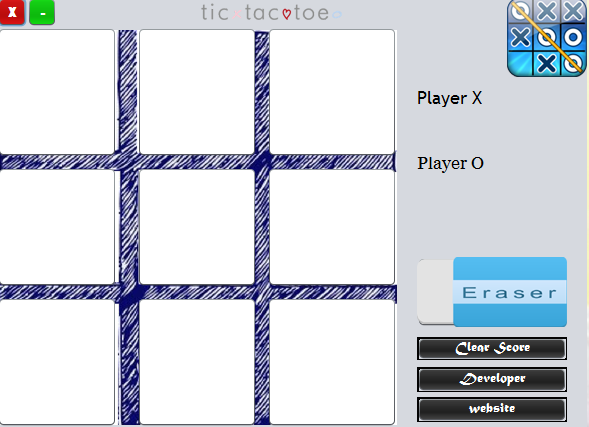

1. download rar file setup.
2. unrar that file using password, is soomro4u than install it.
NotePad create in java
tags:
java projects
notepad created in java
source code notepad in java
here download and install this software and checkout My NotePad 1.5 (created in java by: Ahsan Ali Soomro)
for source code contact # aahsansoomro@gmail.com


java projects
notepad created in java
source code notepad in java
here download and install this software and checkout My NotePad 1.5 (created in java by: Ahsan Ali Soomro)
for source code contact # aahsansoomro@gmail.com
How to create jar file, how to create exe file from that jar file and how to create setup of that program
How to create jar file?
 How to create exe file from that jar file ?
How to create setup of that program?
java Program
.Jar .exe
www.soomro4u.com
How to create jar file, how to create exe file... by aahsan-soomro
How to create exe file from that jar file ?How to create setup of that program?
java Program
.Jar .exe
www.soomro4u.com
java video tutorials in urdu
How to create jar file, how to create exe file... by aahsan-soomro
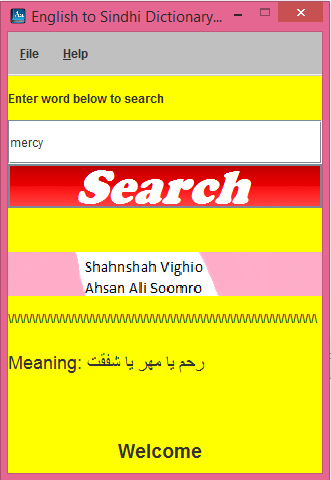

Using 2D array in Java get 3 subject mark and give result total student are 10
// Using 2D array in Java get 3 subject mark and give result total student are 10
// keep visit for more updates
package ahsan;
import java.util.Scanner;
public class Ahsan {
public static void main(String[] args) {
Scanner obj=new Scanner(System.in);
int sum=0, per=0;
int arry [][]= new int [10][3];
for(int r=0; r<10; r++)
{
System.out.print("\t"+(r+1)+" Student :\n");
for(int c=0; c<3; c++)
{
System.out.print("\t"+(c+1)+" Subject Marks :");
arry[r][c]=obj.nextInt();
sum+=arry[r][c];
}
System.out.println("Total is :"+sum);
per=sum*100/300;
System.out.println("Percenstage is :"+per );
if (per >=80)
{System.out.println(" A Grade");}
else if (per >=65)
{System.out.println("B Grade");}
else if (per >= 50)
{System.out.println("C Grade");}
else if (per >=40)
{System.out.println("D Grade");}
else
{System.out.println("Fail");}
sum=0;
per=0;
}
}
}
Output of this Program this is continue Run 10 times.

// keep visit for more updates
package ahsan;
import java.util.Scanner;
public class Ahsan {
public static void main(String[] args) {
Scanner obj=new Scanner(System.in);
int sum=0, per=0;
int arry [][]= new int [10][3];
for(int r=0; r<10; r++)
{
System.out.print("\t"+(r+1)+" Student :\n");
for(int c=0; c<3; c++)
{
System.out.print("\t"+(c+1)+" Subject Marks :");
arry[r][c]=obj.nextInt();
sum+=arry[r][c];
}
System.out.println("Total is :"+sum);
per=sum*100/300;
System.out.println("Percenstage is :"+per );
if (per >=80)
{System.out.println(" A Grade");}
else if (per >=65)
{System.out.println("B Grade");}
else if (per >= 50)
{System.out.println("C Grade");}
else if (per >=40)
{System.out.println("D Grade");}
else
{System.out.println("Fail");}
sum=0;
per=0;
}
}
}
Output of this Program this is continue Run 10 times.
Simple java Input, get number form user and provide table of that number
// Simple java Input
// get number form user and provide table of that number.
package ahsan;
import java.util.Scanner;
public class Ahsan {
public static void main(String []arg){
Scanner obj= new Scanner(System.in);
int a,b;
int ch;
do{System.out.print("Enter Your Number want to
see Table of that number\n");
ch=obj.nextInt();
System.out.println("Table of "+ch+" is :");
for(int i=1; i<11; i++)
{
System.out.println(i+"\t"+ch+"\t"+(i*ch));
}}while(ch!=0);
}
}
Output of this program.

// get number form user and provide table of that number.
package ahsan;
import java.util.Scanner;
public class Ahsan {
public static void main(String []arg){
Scanner obj= new Scanner(System.in);
int a,b;
int ch;
do{System.out.print("Enter Your Number want to
ch=obj.nextInt();
System.out.println("Table of "+ch+" is :");
for(int i=1; i<11; i++)
{
System.out.println(i+"\t"+ch+"\t"+(i*ch));
}}while(ch!=0);
}
}
Output of this program.
Calculator with GUI in Java

Calculator with GUI in Java
You must save file as CalculatorPanel.Java
thank you keep visiting for more updates
/*
* To change this template file, choose Tools | Templates
* and open the template in the editor.
*/
package javaapplication29;
import java.awt.*;
import java.awt.event.*;
import javax.swing.*;
// A panel with calculator buttons and a result display
public class CalculatorPanel extends JPanel {
private JButton display;
private JPanel panel;
private double result;
private String lastCommand;
private boolean start;
public static void main(String[] args) {
CalculatorPanel cp = new CalculatorPanel();
}
public JFrame frame ;
public CalculatorPanel(){
setLayout(new BorderLayout());
result = 0;
lastCommand = "=";
start = true;
// add the display
display = new JButton("0");
display.setEnabled(false);
add(display, BorderLayout.NORTH);
ActionListener insert = new InsertAction();
ActionListener command = new CommandAction();
frame = new JFrame("calculator");
frame.add(this);
frame.setVisible(true);
//add the buttons in a 4 x 4 grid
panel = new JPanel();
panel.setLayout(new GridLayout(4, 4));
frame.setDefaultCloseOperation(JFrame.EXIT_ON_CLOSE);
addButton("7", insert);
addButton("8", insert);
addButton("9", insert);
addButton("/", command);
addButton("4", insert);
addButton("5", insert);
addButton("6", insert);
addButton("*", command);
addButton("1", insert);
addButton("2", insert);
addButton("3", insert);
addButton("-", command);
addButton("0", insert);
addButton(".", insert);
addButton("=", command);
addButton("+", command);
add(panel, BorderLayout.CENTER);
}
/**
* Adds a button to the center panel.
* @param label the button label.
* @param listener the button listener
*/
private void addButton(String label, ActionListener listener)
{
JButton button = new JButton(label);
button.addActionListener(listener);
panel.add(button);
}
/**
* This action insert the button action string to the end of the display text
*/
private class InsertAction implements ActionListener
{
public void actionPerformed(ActionEvent event)
{
String input = event.getActionCommand();
if (start);
{
display.setText(" ");
start = false;
}
display.setText(display.getText() + input);
}
}
/**
* This action executes the command that the button action string denotes
*/
private class CommandAction implements ActionListener
{
public void actionPerformed(ActionEvent event)
{
String command = event.getActionCommand();
if(start)
{
if (command.equals("_"))
{
display.setText(command);
start = false;
}
else lastCommand = command;
}
else
{
calculate(Double.parseDouble(display.getText()));
lastCommand = command;
start = true;
}
}
}
/**
* Carries out the pending calculation.
* @param X the value to be accumalated with the prior result
*/
public void calculate(double x)
{
if(lastCommand.equals("+")) result += x;
else if(lastCommand.equals("-")) result -= x;
else if(lastCommand.equals("*")) result *= x;
else if(lastCommand.equals("/")) result /= x;
else if(lastCommand.equals("=")) result = x;
display.setText("" + result);
}
}
Features of Java
Features of Java
java features:
- Features of Java
- Simple
- Object-Oriented
- Platform Independent
- secured
- Robust
- Architecture Neutral
- Portable
- High Performance
- Distributed
- Multi-threaded
There is given many features of java. They are also known as java buzzwords. The Java Features given below are simple and easy to understand.
- Simple
- Object-Oriented
- Platform independent
- Secured
- Robust
- Architecture neutral
- Portable
- Dynamic
- Interpreted
- High Performance
- Multithreaded
- Distributed
Simple
| According to Sun, Java language is simple because: |
| syntax is based on C++ (so easier for programmers to learn it after C++). |
| removed many confusing and/or rarely-used features e.g., explicit pointers, operator overloading etc. |
| No need to remove unreferenced objects because there is Automatic Garbage Collection in java. |
Object-oriented
| Object-oriented means we organize our software as a combination of different types of objects that incorporates both data and behaviour. |
| Object-oriented programming(OOPs) is a methodology that simplify software development and maintenance by providing some rules. |
| Basic concepts of OOPs are: |
|
Platform Independent
A platform is the hardware or software environment in which a program runs. There are two types of platforms software-based and hardware-based. Java provides software-based platform. The Java platform differs from most other platforms in the sense that it's a software-based platform that runs on top of other hardware-based platforms.It has two components:
|
 Java code can be run on multiple platforms e.g.Windows,Linux,Sun Solaris,Mac/OS etc. Java code is compiled by the compiler and converted into bytecode.This bytecode is a platform independent code because it can be run on multiple platforms i.e. Write Once and Run Anywhere(WORA). Java code can be run on multiple platforms e.g.Windows,Linux,Sun Solaris,Mac/OS etc. Java code is compiled by the compiler and converted into bytecode.This bytecode is a platform independent code because it can be run on multiple platforms i.e. Write Once and Run Anywhere(WORA). |
Secured
| Java is secured because: |
|
 |  |
|
| These security are provided by java language. Some security can also be provided by application developer through SSL,JAAS,cryptography etc. |
Robust
| Robust simply means strong. Java uses strong memory management. There are lack of pointers that avoids security problem. There is automatic garbage collection in java. There is exception handling and type checking mechanism in java. All these points makes java robust. |
Architecture-neutral
| There is no implementation dependent features e.g. size of primitive types is set. |
Portable
| We may carry the java bytecode to any platform. |
High-performance
| Java is faster than traditional interpretation since byte code is "close" to native code still somewhat slower than a compiled language (e.g., C++) |
Distributed
| We can create distributed applications in java. RMI and EJB are used for creating distributed applications. We may access files by calling the methods from any machine on the internet. |
Multi-threaded
A thread is like a separate program, executing concurrently. We can write Java programs that deal with many tasks at once by defining multiple threads. The main advantage of multi-threading is that it shares the same memory. Threads are important for multi-media, Web applications etc.
Dialog box in Java
//File must Save as Abox.java
//just run this program and enjoy :)
//for more keep visiting this blog thanks
package Aboc;
import javax.swing.JOptionPane;
public class Abox
{
public static void main(String[] args)
{
JOptionPane.showMessageDialog(null, "Hi This is Ahsan DOn't Fogate to"
+ " Follow to get more update");
}
}
Output of this program is:

//just run this program and enjoy :)
//for more keep visiting this blog thanks
package Aboc;
import javax.swing.JOptionPane;
public class Abox
{
public static void main(String[] args)
{
JOptionPane.showMessageDialog(null, "Hi This is Ahsan DOn't Fogate to"
+ " Follow to get more update");
}
}
Output of this program is:
C++, how to find character by ASCII or UNI code,
C++, how to find character by ASCII or UNI code, in c++
//don't forget to like FACEBOOK PAGE
Output of this program :) keep ENjoYinG ♥

//don't forget to like FACEBOOK PAGE
Output of this program :) keep ENjoYinG ♥
Subscribe to:
Posts
(
Atom
)
